Data Types in JavaScript: The Foundation Every Developer Must Master

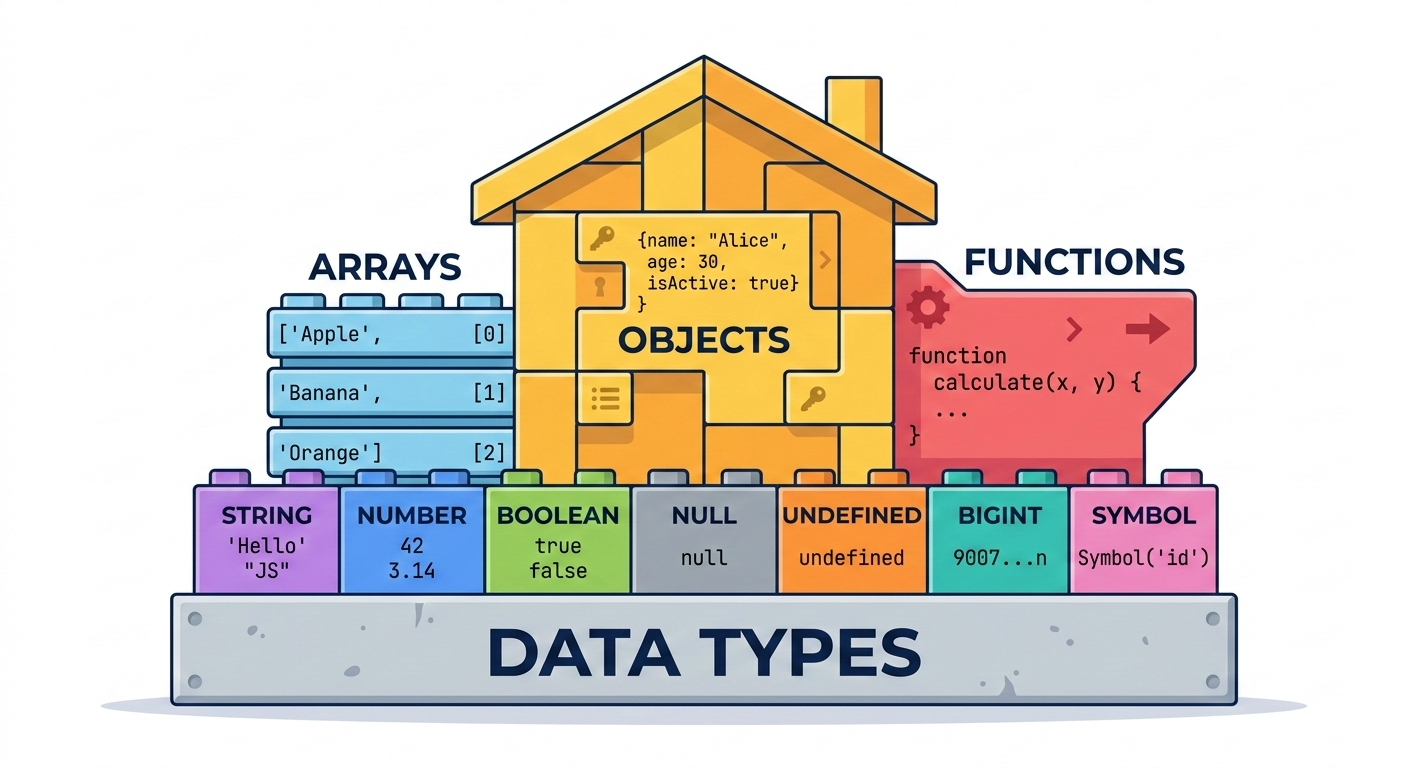
Imagine building a house without knowing the difference between cement, steel, and glass. You might stack materials randomly and hope something stands—but it won’t last.
In JavaScript, data types are your building materials.
Every variable you declare, every API response you handle, every React state you update, every database value you store—everything is built on data types. If you misunderstand them, bugs creep in. Performance suffers. Debugging becomes painful. Interviews become stressful.
But when you deeply understand data types, JavaScript starts making sense.
In this comprehensive guide, we’ll explore:
Primitive vs reference types
All 7 primitive types in detail
Objects, arrays, and functions
Memory behavior (stack vs heap)
typeofoperatorThe
nullbugNaNexplained properlyType coercion
==vs===Real-world examples
Common mistakes
Interview insights
Practice exercises
Let’s begin.
1. The Two Worlds of JavaScript Data
JavaScript divides data into two main categories:
Primitive Types
Reference (Non-Primitive) Types
Understanding this distinction is one of the most important concepts in JavaScript.
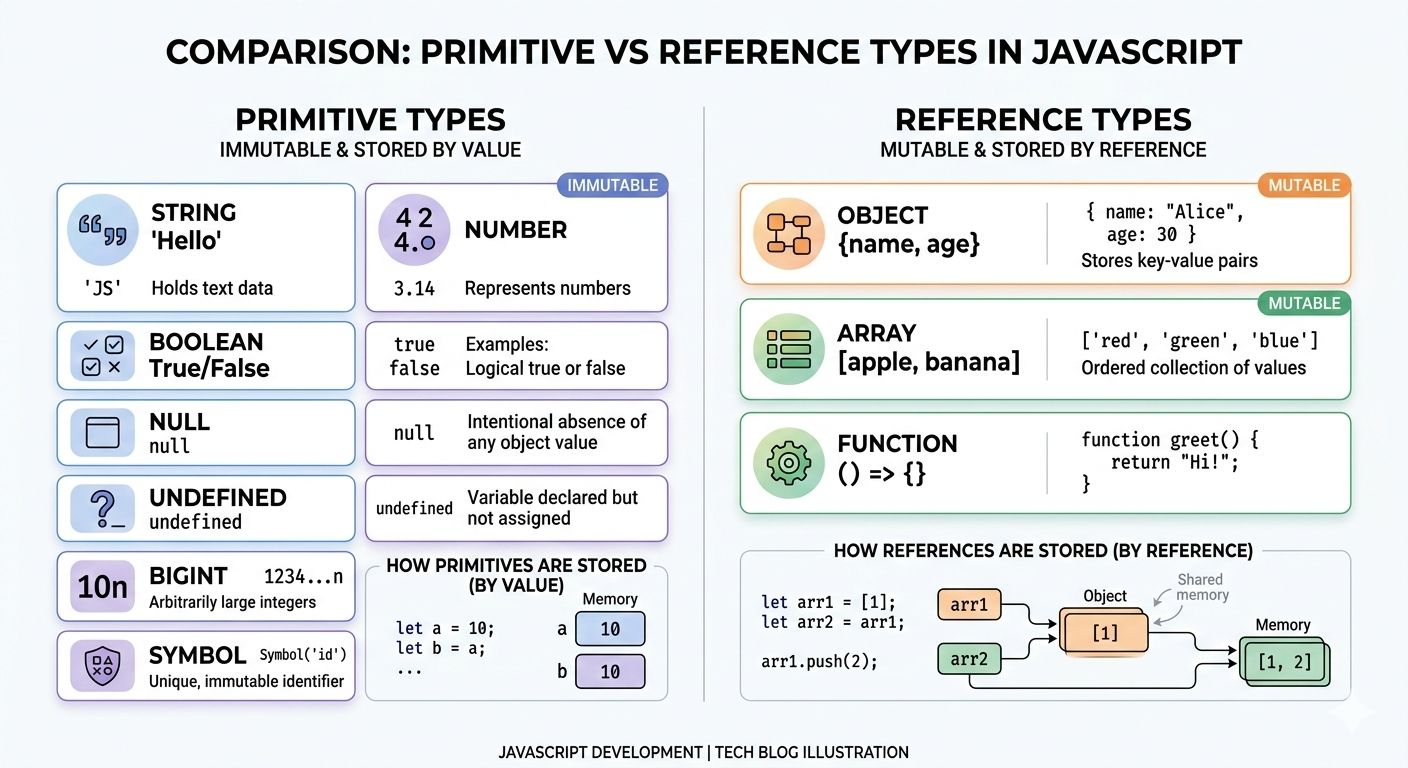
2. Primitive vs Reference Types
Primitive Types
Primitive values are:
Immutable
Stored directly in memory
Compared by value
Simple and lightweight
There are 7 primitive types:
String
Number
Boolean
Undefined
Null
BigInt
Symbol
Reference (Non-Primitive) Types
Reference types:
Are stored by reference (memory address)
Are mutable
Compared by reference
Stored in heap memory
Main reference types:
Object
Array
Function
3. Memory Behavior: Stack vs Heap
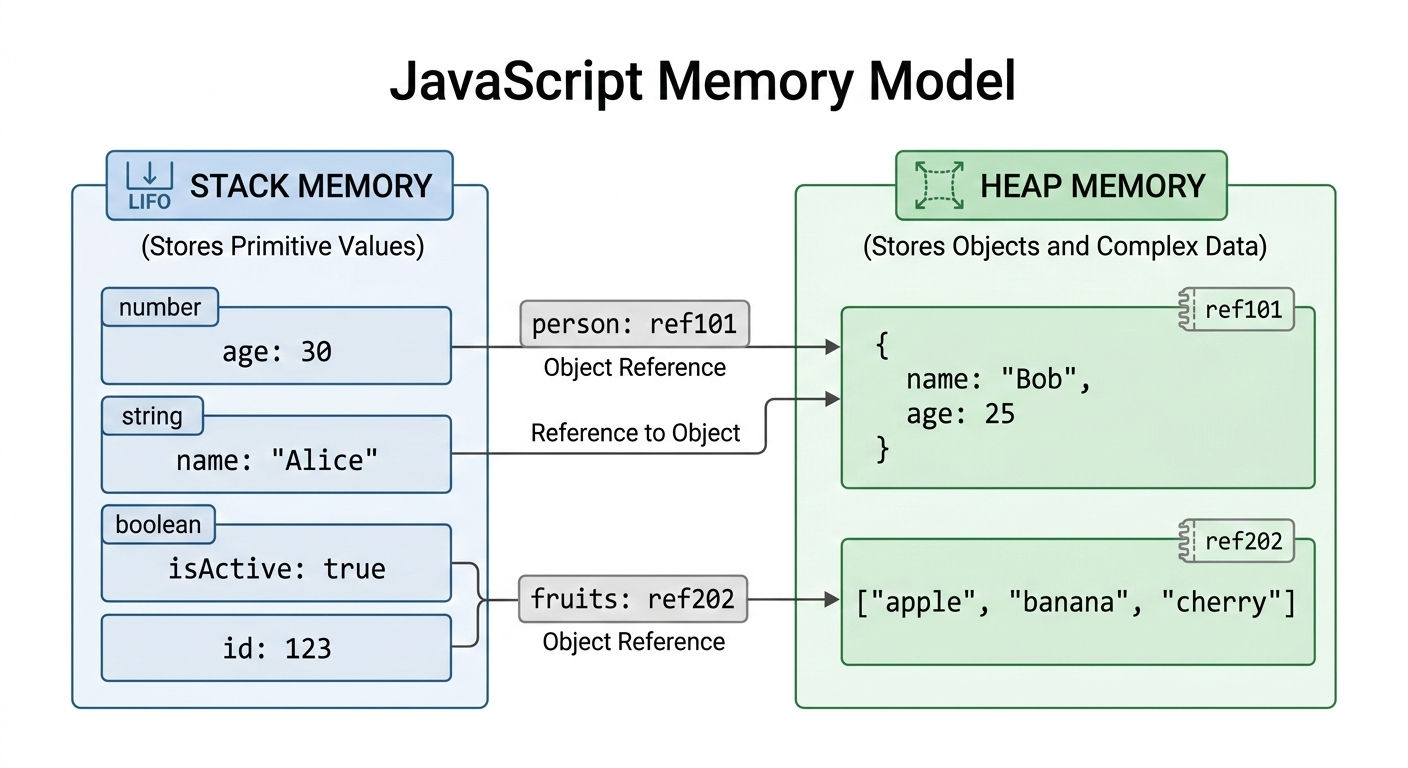
Let’s simplify memory with an analogy.
Stack (Fast Storage)
Think of the stack like a small shelf:
Stores primitive values
Quick access
Organized and simple
let a = 10;
let b = a;
b = 20;

console.log(a); // 10
Why is a still 10?
Because primitives copy the value.
Heap (Reference Storage)
Think of heap as a warehouse:
Stores objects
Larger and more flexible
Accessed via reference
let obj1 = { name: "Ali" };
let obj2 = obj1;

obj2.name = "Ahmed";

console.log(obj1.name); // Ahmed
Both variables point to the same memory location.
4. The 7 Primitive Types (Deep Dive)
4.1 String
Strings represent text.
let name = "Muneeb";
let city = 'Faisalabad';
let message = `Hello ${name}`;
Strings are immutable.
let text = "Hello";
text[0] = "Y";
console.log(text); // Hello
Common methods:
name.length
name.toUpperCase()
name.includes("ee")
name.slice(0, 3)
Real-world example:
{
  "username": "developer123"
}
4.2 Number
JavaScript has only one numeric type.
let age = 25;
let price = 99.99;
Includes:
Integers
Floats
Infinity
NaN
console.log(10 / 0); // Infinity
console.log("abc" - 2); // NaN
What is NaN?
NaN means Not a Number, but:
typeof NaN // "number"
Because internally, it belongs to numeric type but represents an invalid calculation.
4.3 Boolean
Represents true or false.
let isLoggedIn = true;
let hasPermission = false;
Used in conditions:
if (isLoggedIn) {
  console.log("Welcome back!");
}
4.4 Undefined
A variable declared but not assigned.
let data;
console.log(data); // undefined
JavaScript assigns undefined automatically.
4.5 Null
Represents intentional absence of value.
let selectedUser = null;
Used when:
No data yet
Reset value
Waiting for API
The Famous Null Bug
typeof null // "object"
This is a historical bug in JavaScript from its early days and cannot be fixed for backward compatibility.
4.6 BigInt
Used for extremely large numbers.
let bigNumber = 9007199254740991n;
Normal numbers cannot safely represent very large integers beyond:
Number.MAX_SAFE_INTEGER
BigInt solves that.
4.7 Symbol
Creates unique identifiers.
let id = Symbol("id");
Even if descriptions match:
Symbol("id") === Symbol("id"); // false
Used in:
Library development
Object property keys
Internal mechanisms
5. Reference Types
5.1 Object
A collection of key-value pairs.
const user = {
  name: "Muneeb",
  age: 22,
  isDeveloper: true
};
Objects are used everywhere:
API responses
Database records
Config settings
5.2 Array
Special type of object for ordered data.
const skills = ["HTML", "CSS", "JS"];
Important:
typeof skills; // "object"
Array.isArray(skills); // true
Common methods:
skills.push("React");
skills.map(skill => skill.toUpperCase());
5.3 Function
Functions are objects.
function greet() {
  console.log("Hello");
}

typeof greet; // "function"
Arrow function:
const greet = () => console.log("Hello");
6. The typeof Operator
Used to check type.
typeof "Hello";      // "string"
typeof 123;          // "number"
typeof true;         // "boolean"
typeof undefined;    // "undefined"
typeof null;         // "object"
typeof {};           // "object"
typeof [];           // "object"
typeof function(){}; // "function"
Important note: arrays return "object".
7. Type Coercion
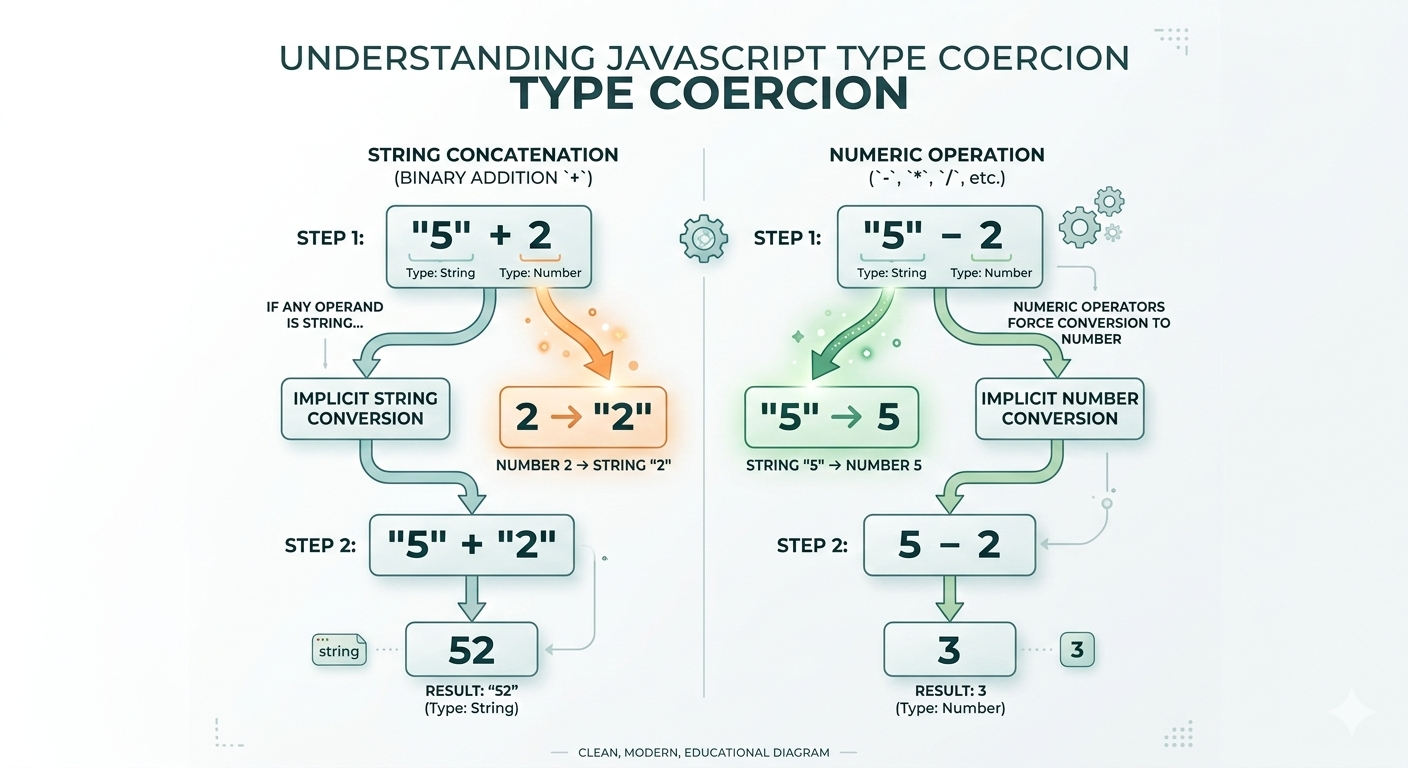
JavaScript automatically converts types.
Implicit Coercion
"5" + 2;  // "52"
"5" - 2;  // 3
true + 1; // 2
Explicit Conversion
Number("10");
String(100);
Boolean(0);
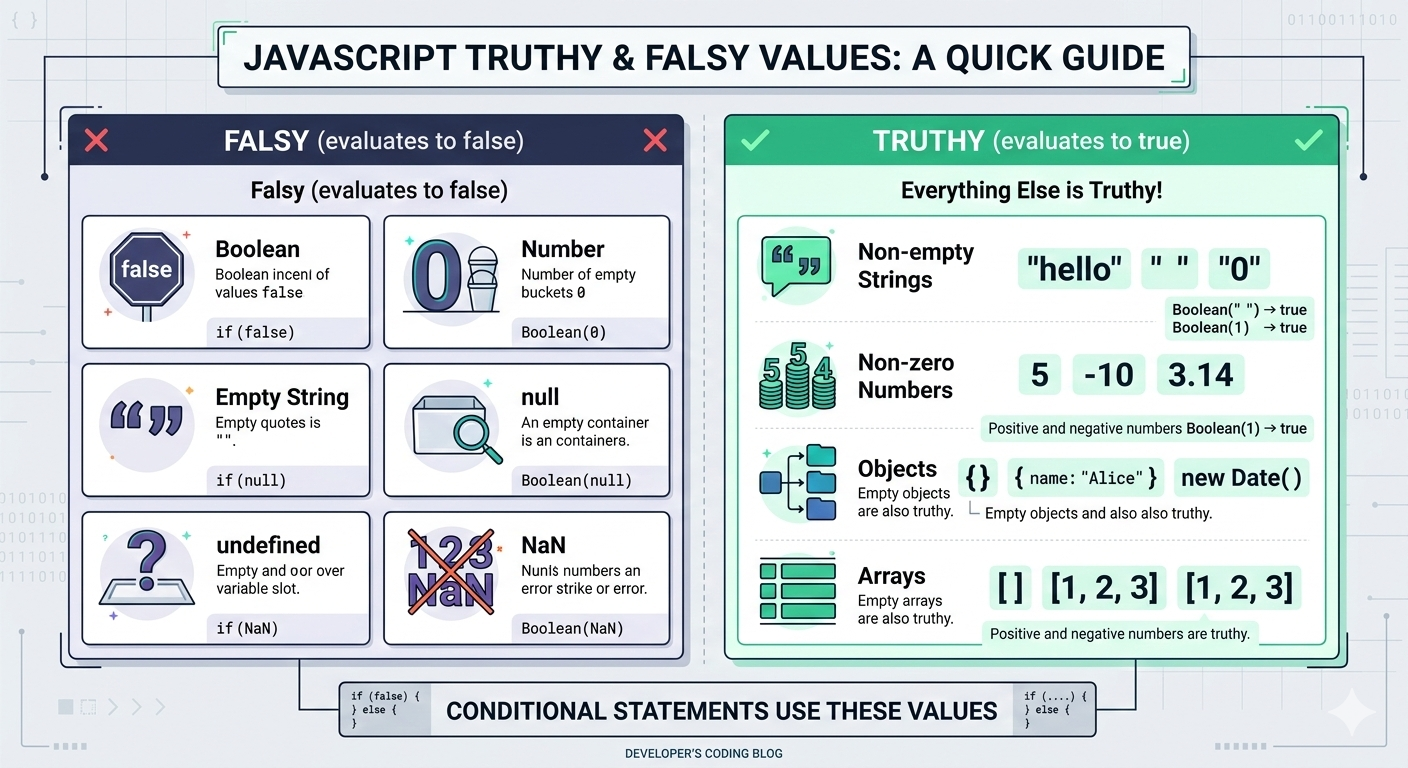
Truthy values:
Non-empty strings
Non-zero numbers
Objects
Falsy values:
false
0
""
null
undefined
NaN
8. == vs ===
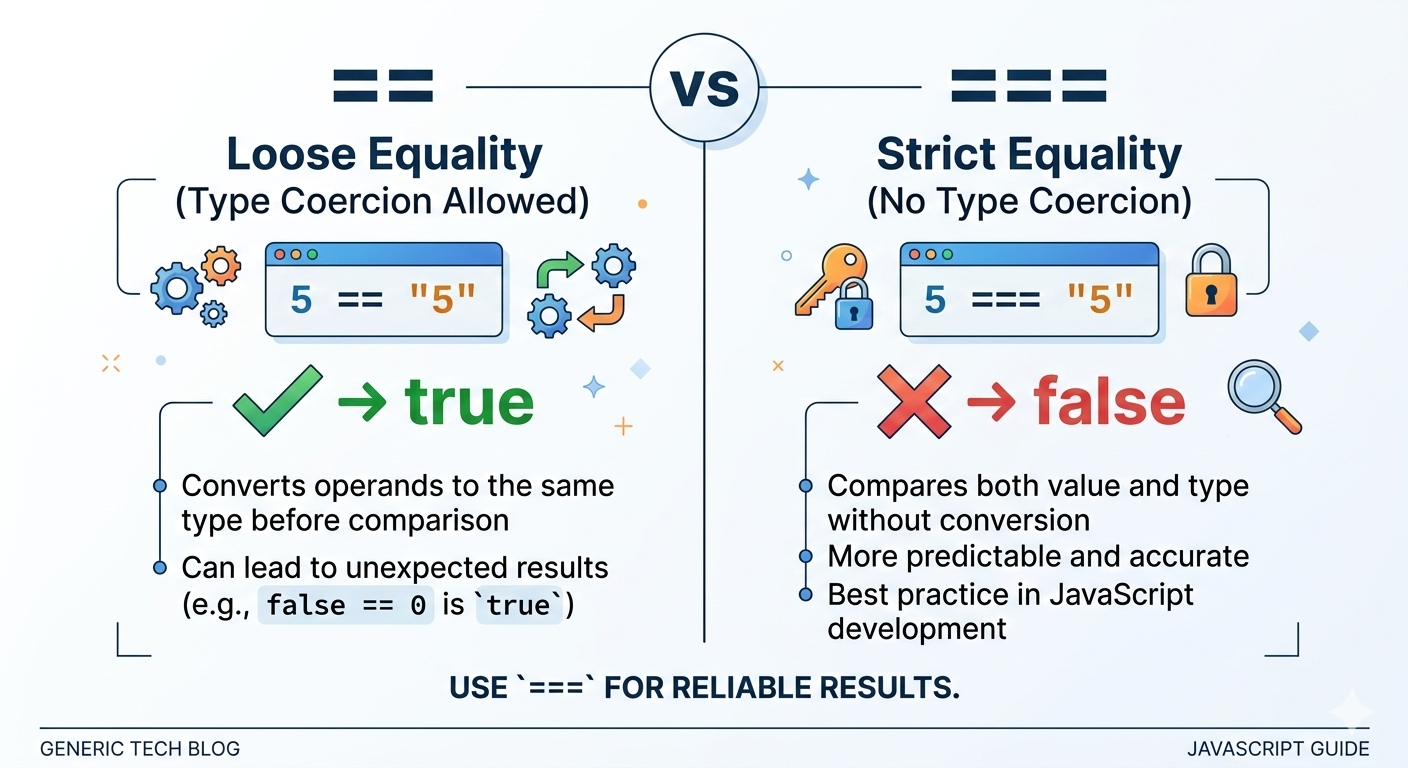
Loose equality:
5 == "5"; // true
Strict equality:
5 === "5"; // false
Always prefer ===.
9. Comparison Table
| Type | Category | Mutable | typeof Result |
|---|---|---|---|
| String | Primitive | No | "string" |
| Number | Primitive | No | "number" |
| Boolean | Primitive | No | "boolean" |
| Undefined | Primitive | No | "undefined" |
| Null | Primitive | No | "object" |
| BigInt | Primitive | No | "bigint" |
| Symbol | Primitive | No | "symbol" |
| Object | Reference | Yes | "object" |
| Array | Reference | Yes | "object" |
| Function | Reference | Yes | "function" |
10. Common Developer Mistakes
Confusing
nullandundefinedUsing
==instead of===Checking arrays with
typeofForgetting that objects are compared by reference
Misunderstanding type coercion
11. Interview-Focused Insights
Interviewers love asking:
Why is
typeof nullobject?Difference between primitive and reference?
What is NaN?
Difference between
==and===?How does memory work?
What are truthy and falsy values?
If you understand this article deeply, you can answer all confidently.
12. Real-World Example
API Response:
{
  id: 1,
  name: "Muneeb",
  isAdmin: false,
  skills: ["HTML", "CSS"],
  profile: null
}
You must understand types to:
Validate data
Handle null cases
Convert types
Prevent bugs
13. Practical Exercises
- What will this output?
console.log("10" + 5);
console.log("10" - 5);
- Why does this happen?
console.log(typeof null);
- Fix this bug:
if (userInput == 0) {
  // problem?
}
- Explain why this changes original object:
let a = { x: 1 };
let b = a;
b.x = 2;
Final Thoughts
JavaScript data types are not just theory.
They determine:
How memory works
How comparisons behave
How APIs respond
How React state updates
How backend logic executes
Mastering data types means mastering JavaScript’s foundation.
Once you deeply understand:
Primitive vs reference
Stack vs heap
Type coercion
Equality operators
Null and undefined
You stop writing accidental bugs.
And you start writing intentional code.
Comments
Join the discussionNo comments yet. Be the first to comment.